Pawgress
Track what you lift on each gym machine.
Pawgress is a weight-tracking app for people who work a circuit of gym machines. It answers one question, fast: how much did I lift on this machine last time? No reps, no sets, no rest timers — one number per machine per gym day.
How it works
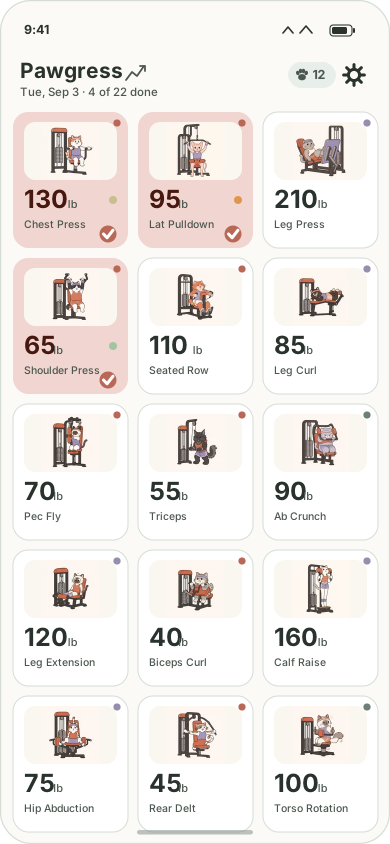
- A grid of your machines. Each tile shows the machine's icon, its name, and the last weight you lifted on it — deliberately large, so it's readable at arm's length while you're standing at the machine.
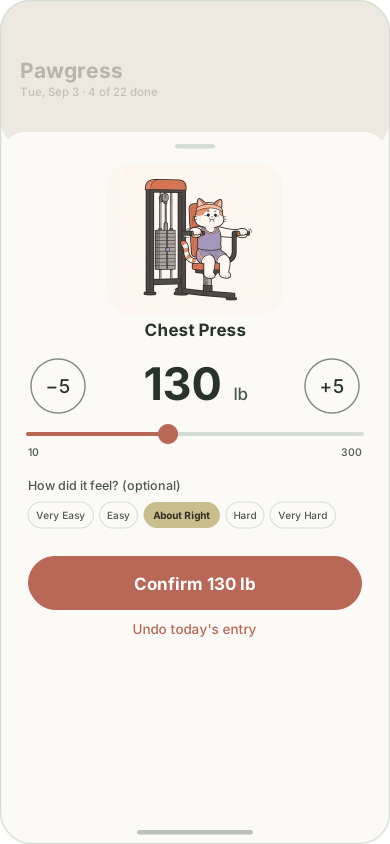
- One tap to log. Tapping a tile opens a sheet with the previous weight already dialed in, so confirming it is a single tap. Big −5 / +5 buttons and a slider handle the days it changed.
- The day resets at 4am. A late-night session still counts as that evening's workout, and nothing flips over underneath you mid-workout.
- Your exercises, named your way. 39 machines and 33 free-weight exercises come preloaded, each with its own illustration. Hide the ones your gym doesn't have, rename them to match your gym's labels, change their icons, or add your own.
- A dial that matches your gym. The weight range and step size are yours to set, separately for machines and for free weights — a pin stack and a dumbbell rack don't climb in the same increments.
- Trends and stats. Per-machine progress charts, biggest gains, streaks, and lifetime totals.
- Coaches — for fun, not for training. Logging lifts earns pawprints, which unlock a roster of cartoon cat characters with seasonal outfits. They are decorative companions for entertainment only: each one displays randomized affirmations drawn from a fixed library of pre-written lines — occasionally nodding to something like a streak or a personal best — purely as lighthearted encouragement. They are not athletic coaches and provide no training, exercise, form, or fitness advice of any kind.
Your data, and getting a copy of it
Pawgress works completely offline and is fully usable without signing in to anything. If you choose to connect a Google account, the app creates a spreadsheet named Pawgress in your own Google Drive and mirrors each lift into it as a row, so your history is yours in a plain, portable format you can open, chart, or export any time. A second tab backs up how your grid is set up, so a reinstall restores your exercises named, hidden and ordered the way you had them.
Google sign-in isn’t built for iPhone yet, so there the backup route is
the Files app instead: Pawgress publishes its folder under
On My iPhone → Pawgress, and the single
pawgress.json file inside it is your whole log. Copy it out
to back up, copy it back in to restore — no account and no network
involved. Settings shows whichever route applies to the phone you’re
holding.
The app uses Google's drive.file scope, which grants access
only to files the app itself created. Pawgress cannot see, read, or touch
anything else in your Drive. There is no Pawgress server — your data goes
to your device and, if you opt in, to your own Google account. Nowhere
else. See the Privacy Policy for the full
detail.
How to use it
The user manual walks through the whole app: logging a lift, what the colored dots mean, the 4am gym day, setting the weight range, setting up your own machines, the Trends charts, and how to back up your data on each platform.
Availability
Pawgress is built with Kotlin Multiplatform and runs on both Android and iOS from one shared codebase. The Android version is preparing for release on Google Play; the iOS version is in active development — it runs, but Google sign-in there isn’t built yet, so iPhone backups go through the Files app. The source is public at github.com/BennettLandman/pawgress-kmp.
Contact
Questions, bugs, or feedback: balandman@gmail.com.